

Save jobs in one press
Drag one button to your bookmarks bar. Then, on any job ad, press it: the job title, the employer, the place, the listing reference and the whole ad come across to your board, for you to check before anything is saved. It works on Seek, on LinkedIn, on a company's own careers page, and on anything else with a job on it.
Bookmarks bar hidden? Ctrl + Shift + B shows it, or Cmd + Shift + B on a Mac.
Setting it up, once
It takes about a minute, and you never do it again. You need a computer: a phone has no bookmarks bar to drag anything to.
-
Show your bookmarks bar, if it is hidden
Chrome, Edge and Firefox: Ctrl + Shift + B, or Cmd + Shift + B on a Mac. Safari: the View menu, then Show Favourites Bar. The bar appears under the address bar.
-
Drag the button up onto it
The green button above, or the same one at the top of the app once you are signed in. Drag it up onto your bookmarks bar and let go. Pressing it here does nothing: it is meant to be dragged.
-
Open a job ad and press it
Any job ad, on any site. Press the bookmark you just made. Your browser reads the ad on the page in front of you, the way copying it by hand would, and opens jobtracker.co.nz with it.
-
Check what it found, then add it
The app shows you what came across and asks. Nothing is saved until you press Add it, and nothing is added twice: press the button again on the same ad and it says you already have it.
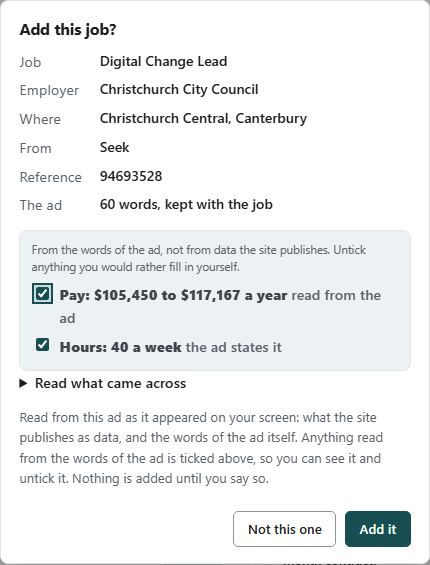
It asks first, every time
What the job site publishes as data is listed plainly. Anything read from the words of the ad, which on Seek is usually the pay and the hours, is shown separately and ticked, with the figures in front of you.
Untick either one and it stays empty for you to fill in. Press Not this one and nothing is kept at all.
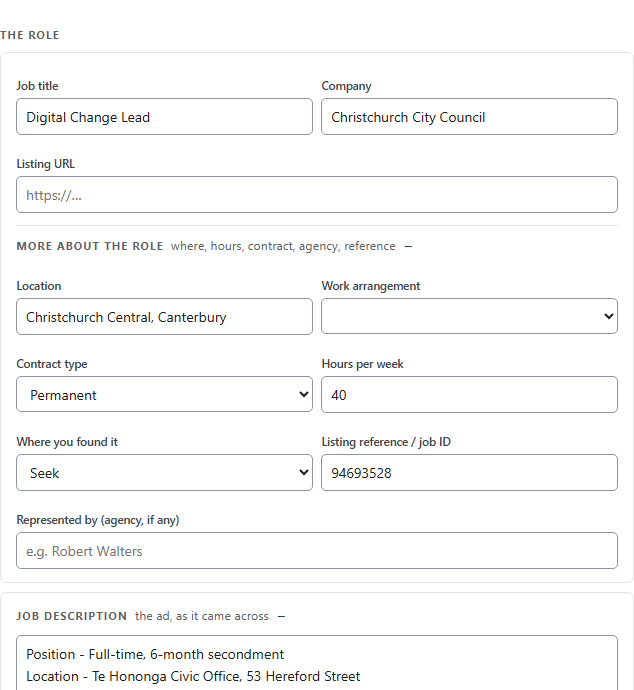
Then it is yours, ad and all
The job lands filled in, with the listing reference you would quote on the phone and the description kept against it. Listings come down after a fortnight; this does not.
From there it is a job like any other on your board: a stage, a next step, the people you talk to, and what it really pays after tax.
What comes across
Everything the ad states about itself, and nothing it does not.
| What | Where it comes from |
|---|---|
| Job title, employer, location | What the site publishes as data about the ad |
| The whole job description | The words of the ad on the page, as text |
| Listing reference | The ad's own id, out of the address |
| Closing date, listed date, work type | The ad, where it states them |
| Category and industry | What the job site files the ad under |
| Pay | Published data where there is any. Where the ad only writes it in a sentence, it is read from the sentence and shown to you ticked, with the figures, so you can untick it |
| Hours a week | The ad where it states them. Where it only says Full time, 40 goes in, labelled as the assumption it is |
What never comes across: anything it would have to guess. A pay line that says "competitive salary" stays empty rather than becoming a number, and a weekly figure is never quietly turned into a yearly one.
What it never does
- It reads one page, when you press it. Not in the background, not on a schedule, not on any other tab. Nothing is installed that watches job sites.
- Our server never visits a job site. The reading happens inside your own browser, on a page you opened yourself. We do not crawl or scrape anybody's listings.
- The job travels after the
#in the address, and a browser never sends that part to any server. The job title and the employer are not in our logs on the way in. - Nothing is saved until you say so, and the address is cleared either way, so a refresh cannot add the same job twice.
All of that is on the privacy page too, in the section written for it.
When it does not work
- It says it does not look like a job ad
- You are on a list of search results rather than on the ad. Open the job itself, so the address is the job's own, and press it again.
- I am on my phone
- Phones have no bookmarks bar. Use + Add job in the app and paste the link and the ad text into the box at the top: it reads what you paste without fetching anything.
- Nothing happens on some pages
- Browser settings pages, the extension store and PDF files are closed to everything, including this. Open the ad as a web page.
- The site published nothing about the ad
- Then the title and the link still come across, and the rest is yours to fill in. It is still faster than typing all of it.
- It says I already have this one
- You do. The same ad is recognised by the id in its address, so saving it from a search result and again from the ad itself does not make two jobs.
Try it on the next job you see
Free while you are between jobs, with no card. The button is on this page and at the top of the app.